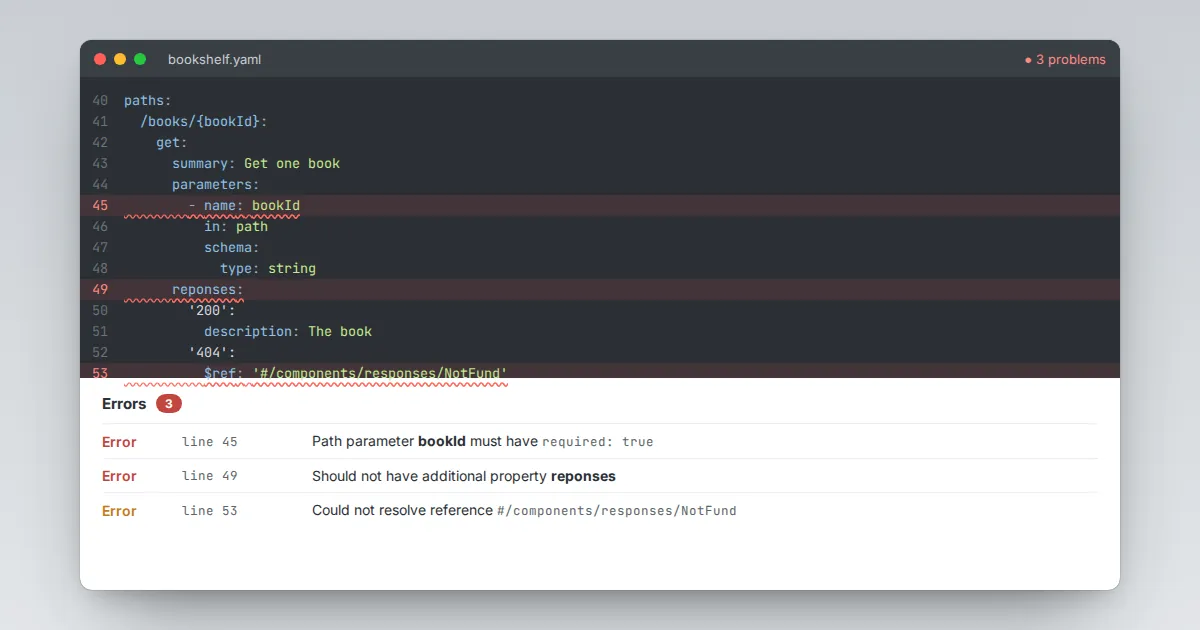
Live validation is the feature people value most in Swagger Editor, but the messages can look cryptic at first. Most errors fall into a handful of patterns, and once you recognise them you can clear a red panel in minutes.
How errors are reported
Problems appear in two places: a marker in the editor gutter on the offending line, and a list above the preview. Each entry shows the line number and a path into the document, such as paths./books.get.responses.
The path is often more useful than the message itself, because it tells you exactly which object the validator was looking at.
Parser errors come first
If the YAML itself is broken, nothing else can be checked. Look for messages about bad indentation, unexpected tokens or duplicate keys.
Fix these before anything else; one parser error can hide dozens of real schema problems below it.
The errors you will see most
- Missing required property. An object lacks a field the specification demands, such as
descriptionon a response ortitleininfo. Add the field at the reported path. - Should not have additional properties. You used a key that is not allowed in that position. Usually it is a typo (
reponses) or a field placed one level too deep or too shallow. - Path parameter must be required. Any parameter with
in: pathneedsrequired: true. - Declared path parameter not defined. The URL contains
{id}but no parameter namedidexists, or the names differ in case. - Could not resolve reference. A
$refpoints to a component that does not exist. Check spelling and that the target sits under the right section ofcomponents. - Semantic warnings. Duplicate operation IDs or unused definitions. They do not break the file but will trouble code generators later.
A calm debugging routine
- Fix parser errors from top to bottom.
- Fix the first schema error only, then let the list refresh. One mistake often causes several messages.
- Use the path in the message to jump to the exact object.
- Compare against a small known-good example if a message still makes no sense.